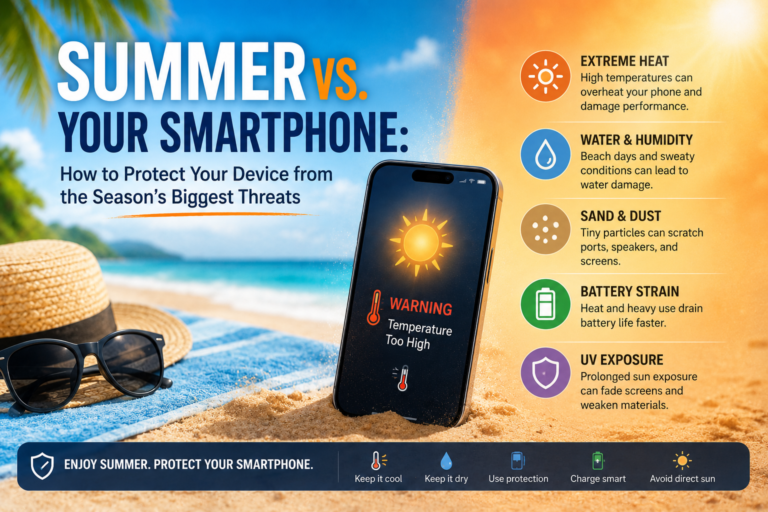
Summer is the ultimate season for travel, beach getaways, and outdoor adventures. But for your smartphone, it’s a high-stakes obstacle course. High temperatures, water, sand, and dust can ruin a device in a single careless afternoon.
Fortunately, you don’t need to lock your phone away. By understanding your device’s limitations and taking a few preventive steps, you can keep it running smoothly and avoid any problems while playing at the 250 peso online casino or watching a YouTube video. Let’s look at how to prep your smartphone for summer and protect it from the season’s three biggest threats.
Water Resistance: Why an IP68 Rating Won’t Save Your Phone at the Beach
Most modern flagship and mid-range smartphones come with an IP67 or IP68 rating. This means they are certified to resist dust and survive brief immersion in freshwater under strict laboratory conditions. Real-world environments, however, are a completely different story:
- Salt and chlorine are highly corrosive. Saltwater and pool chemicals degrade contacts, charging ports, and speakers much faster than freshwater. Even if your phone survives a quick dip, internal corrosion can show up weeks later.
- Charging a wet phone is dangerous. Plugging a charger into a damp port can trigger a short circuit or cause severe electrical corrosion.
- Skip the hair dryer, radiator, and rice. Hot air warps waterproof seals and melts adhesive, while rice leaves behind starchy dust and fails to draw moisture out from deep inside the components.
What to do if your phone gets wet:
- Turn the device off immediately.
- Gently pat the body dry with a cloth or tissue, paying close attention to the ports and speakers.
- Place the phone in a dry spot with plenty of airflow. If you have silica gel packets, place them next to the device.
- Do not turn the phone on or charge it for at least 24 to 48 hours.
- If it fell into saltwater or a pool, take it to a repair professional to have the internal contacts cleaned safely.
Pro-Tip: For outdoor activities, use a waterproof dry pouch. These cases keep the touchscreen functional and let you snap photos underwater without risking your device.
Overheating: How to Protect Your Battery in Extreme Heat
Lithium-ion and lithium-polymer batteries operate best between 0°C and 35°C. When temperatures climb past 40°C, battery cells degrade rapidly, capacity drops, and your phone’s software may throttle performance or shut down entirely to protect itself.
How to prevent overheating:
- Keep your phone out of direct sunlight. Leaving it in a hot car, on a beach towel, or on a sunny windowsill can push internal temperatures to 50–60°C in just 10 to 15 minutes.
- Ditch heavy cases in hot weather. Thick cases act as insulation, blocking your phone’s natural ability to shed heat.
- Turn on power-saving mode and lower your screen brightness. Disabling 5G, GPS, and background syncing when they aren’t needed will significantly reduce internal heat.
- Avoid heavy processing tasks outdoors. Running GPS navigation while under direct sunlight or playing graphics-heavy games is a guaranteed way to overheat your device.
What you should absolutely avoid:
- Never put your phone in the fridge or freezer. Rapid temperature drops cause condensation inside the chassis, which is far more destructive than the heat itself.
- Do not blast it with cold air from an air conditioner. Extreme temperature shocks can crack the glass and damage internal seals.
Safe Cooling: Move the device to the shade, place it on a cool (but dry) surface, or use a portable fan to lower its temperature gradually.
Sand and Dust: The Invisible Enemies of Ports and Speakers
Fine sand is highly abrasive and easily finds its way into any opening. It can scratch your screen, clog speakers, jam buttons, and ruin the delicate pins inside your charging port.
Prevention and maintenance:
- Never place your phone directly on the sand. Use zippered pockets, a fanny pack, or a dedicated compartment in your beach bag.
- Clean with care. Use a soft, anti-static brush or a dry microfiber cloth to remove sand particles. Avoid blowing into the ports with your mouth, as your breath contains moisture that can push grit deeper inside.
- Clear ports safely. Carefully clear charging ports and speakers with short bursts from a compressed air can, keeping the can upright. Avoid vacuum cleaners, as static buildup and high suction can damage sensitive microphone and speaker membranes.
- Wipe it down. After a day at the beach, wipe down the phone’s body with a damp, alcohol-free, non-abrasive cloth, then let it dry.
Your Summer Smartphone Checklist: 7 Essential Rules
- Back up your data before you head out on your trip.
- Update your OS and apps. Manufacturers frequently release software updates that optimize thermal performance and battery efficiency.
- Keep your phone enclosed. Store it in an inner pocket or a closed bag rather than holding it in your hand under the hot sun.
- Use protection. Equip your phone with a screen protector and a case with raised edges to shield against scratches and accidental drops.
- Store it in the shade. Lithium elements are highly sensitive to heat.
- Don’t ignore warnings. If your phone alerts you that it is overheating, give it a break and let it cool down.
- Check your warranty terms. Most manufacturers don’t cover liquid damage, even if the device has an IP68 rating.
Summer is no reason to leave your phone behind. With the right preparation, it will remain your go-to navigator, camera, and lifeline throughout your travels. Just remember that laboratory protection ratings don’t account for real-world elements. A little prevention, some common sense, and quick maintenance will let you enjoy your vacation without worrying about your tech.